
How to Remove a Feature List from WHM
Follow this tutorial if you have a feature list you don't need and want it removed.
1. Log in to your WHM Account.
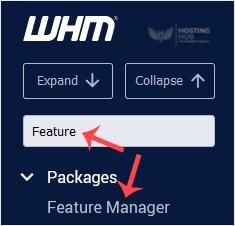
2. Go to Packages >>Feature Manager or typeFeature Manager in the menu filter box. The option will appear. Click on it.
3. Under Manage feature list , choose the feature list you wish to remove
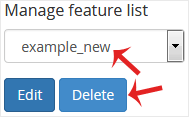
4. Click on Delete.
Congratulations. Your selected feature list has been successfully removed.
Updated on: 28/04/2026
Thank you!