
How to Change the Default Nameservers in the WHM Root
You can change the default nameservers in your WHM Root Account.
Note : Root access is required. You cannot access it with a WHM Reseller account.
1. Log in to your WHM Root Account.
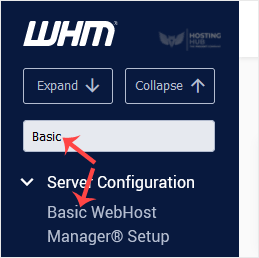
2. Go to Server Configuration >> Basic WebHost Manager® Setup or type Basic in the menu filter box. The option will appear. Click on it.
3. Scroll to the end of the page. Under Nameservers , enter your Nameservers in the text field.
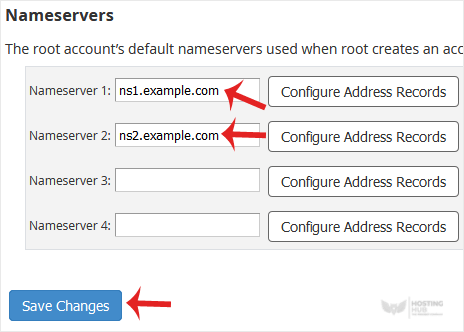
4. Click on Save Changes.
The nameservers will be changed successfully.
Updated on: 28/04/2026
Thank you!